
Clone model components with #importNS
This guide shows how to use #importNS to copy the same model components multiple times, rename them automatically, and connect them within one model.
Describe a cell model once, then import its components for several cell types. Each copy can have its own parameter values while sharing selected components with the others.
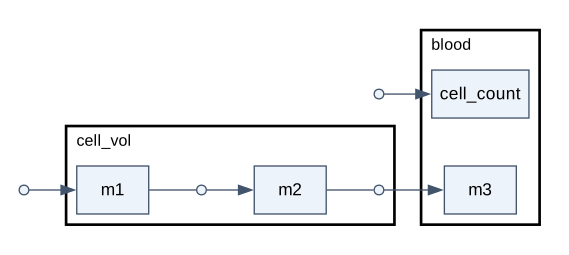
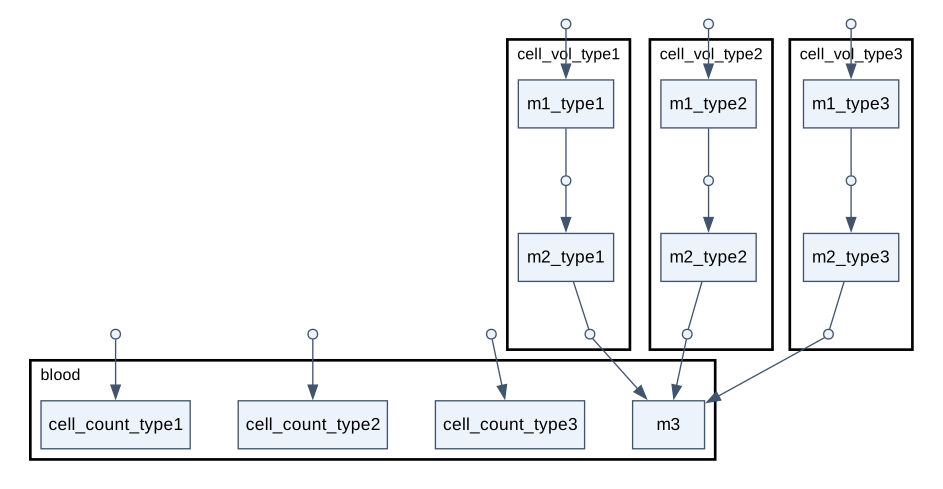
Unlike model variants, the imported blocks become parts of one model. Each cell type has its own intracellular species and parameters, but all release a substance into the same blood pool.
Before you start, follow the Quick start to install heta-compiler, Julia, HetaSimulator, and Plots.
Create this directory and run all commands from it:
clone-model-components/
├── cell-type.heta  # reusable cell model
├── index.heta      # imports and cell-type-specific changes
└── run.jl          # simulation
Define the template
Create cell-type.heta:
namespace cell_template begin
  /* Cell proliferation and total cell volume. */
  blood @Compartment .= 5.3;
  cell_count @Species { compartment: blood } .= 1;
  v_prol @Reaction { actors: => cell_count } := k_prol * cell_count;
  k_prol @Const = 1e-3;
  cell_vol @Compartment := 1e-6 * cell_count;

  /* Intracellular synthesis, conversion, and transport to blood. */
  m1 @Species { compartment: cell_vol } .= 0;
  m2 @Species { compartment: cell_vol } .= 0;
  m3 @Species { compartment: blood, output: true } .= 0;

  vsyn_m1 @Reaction { actors: => m1 } := ksyn * cell_vol;
  v_m1_m2 @Reaction { actors: m1 => m2 } := kcat_m1 * m1 / (Km1 + m1) * cell_vol;
  vtr_m2 @Reaction { actors: m2 => m3 } := P * S * (m2 - m3);

  ksyn @Const = 1e-2;
  kcat_m1 @Const = 1e-1;
  Km1 @Const = 12;
  P @Const = 1.2;
  S @Const = 1e-8;
end
This small illustrative model describes one cell type. The substances m1 and m2 are inside the cells; m3 is in blood.
Import several cell types
Create index.heta with the complete content below:
include ./cell-type.heta;

/*
  Import all template components into nameless, the default namespace.
  suffix gives each cell type its own identifiers and updates references.
  rename keeps blood and m3 shared. Keep t unchanged for compiler 0.12.x.
*/
#importNS {
  fromSpace: cell_template, suffix: "_type1",
  rename: { blood: blood, m3: m3, t: t }
};

#importNS {
  fromSpace: cell_template, suffix: "_type2",
  rename: { blood: blood, m3: m3, t: t }
};

/* Type 3 uses the same structure but different parameter values. */
#importNS {
  fromSpace: cell_template, suffix: "_type3",
  rename: { blood: blood, m3: m3, t: t }
};
k_prol_type3 = 0.6e-3;
ksyn_type3 = 2e-2;
For example, m2 becomes m2_type1, and its reaction references are renamed automatically. Explicit rename entries take priority over suffix: m3 remains m3, so all three transport reactions feed the same species.
The parameter updates follow the third import and affect only that cell type. Leave out @Const when updating an existing constant.
Build and inspect
Export all namespaces to SBML and DOT:
heta build --export="SBML,Dot"The files appear in dist/sbml/ and dist/dot/ for both cell_template and the assembled model, nameless. DOT describes the model graph and can be displayed with a Graphviz viewer, as in the diagrams above.
Simulate
Create run.jl:
using HetaSimulator, Plots

platform = load_platform(@__DIR__)
model = models(platform)[:nameless]
scenario = Scenario(
  model, (0., 1e4);
  observables = [:m3, :m2_type1, :m2_type2, :m2_type3]
)
sim(scenario; abstol = 1e-9) |> plot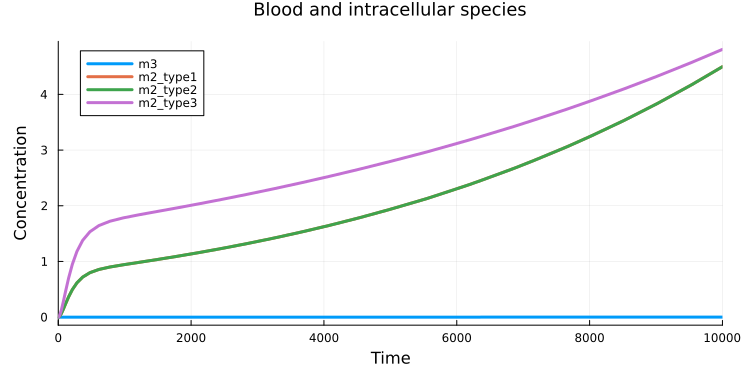
The small cell volumes require a tighter absolute solver tolerance (abstol) to avoid numerical artifacts in intracellular concentrations.
The observables option selects the shared blood species m3 and m2 from each cell type. Types 1 and 2 have identical parameters, so their m2 curves overlap. Type 3 proliferates more slowly and synthesizes m1 twice as fast, producing a higher intracellular concentration of m2. The much smaller concentration of m3 keeps its curve close to the horizontal axis on this scale.
Keep the template as your source
To add a cell type, add another import with a unique suffix. To change the shared structure, edit cell-type.heta and rebuild or reload the platform. Keep editing these source files rather than an exported table, so future changes still apply to every imported block.
Check the resulting model when choosing rename: matching identifiers can replace existing components. A short source file can also generate a large model; imports reduce repeated code, not the simulation workload.