
Create model variants with Heta namespaces
This guide shows how to reuse a base model, create two variants, and simulate them in one Heta platform.
Instead of copying an entire model, include the same file in separate namespaces and describe only the changes. Each namespace produces an independent model.
Before you start, follow the Quick start to install heta-compiler, Julia, HetaSimulator, and Plots.
Create a directory named model-variants. In the steps below, you will add these files:
model-variants/
├── base-model.heta  # shared model code
├── index.heta       # base model and namespace variants
└── run.jl           # simulations and plotting
Run all commands from this directory. Exported models will appear in dist/, and the Julia code will display the simulation plots.
Define the base model
Create base-model.heta:
comp1 @Compartment .= 1;

s1 @Species { compartment: comp1 } .= 10;
s2 @Species { compartment: comp1 } .= 0;

r1 @Reaction { actors: s1 => 2 * s2 } := k1 * s1 * comp1;
r2 @Reaction { actors: s2 => } := k2 * s2 * comp1;

k1 @Const = 1e-3;
k2 @Const = 1e-4;
The model converts s1 into s2, which is then removed. Both reactions use mass-action kinetics.
Create the variants
Create index.heta in the same directory with the complete content below:
/*
  Base model: without an explicit namespace, components belong
  to the default namespace, nameless.
*/
include ./base-model.heta;

/*
  Variant 1: include the base model in its own namespace, then
  replace r2 with Michaelis-Menten kinetics and add its parameters.
  Deleting the unused k2 is optional. These changes affect only variant1.
*/
namespace variant1 begin
  include ./base-model.heta;

  r2 := Vmax * s2 * comp1 / (Km + s2);
  Vmax @Const = 5e-3;
  Km @Const = 1e-4;
  #delete k2;
end

/*
  Variant 2: add s3 as the product of r2 instead of removing s2
  from the system. Updating actors keeps the original rate expression.
*/
namespace variant2 begin
  include ./base-model.heta;

  s3 @Species { compartment: comp1 } .= 0;
  r2 { actors: s2 => s3 };
end
You now have three models: nameless, variant1, and variant2. Shared code stays in base-model.heta: after editing that file, rebuild or reload the platform to apply the changes to every model, followed by each variant's own updates.
Build and export
Run from the project directory:
heta build --export=SBMLThe compiler writes a separate SBML file for each namespace into dist/sbml/. To export only the two variants, use a namespace filter:
heta build --export="{format:SBML,spaceFilter:'variant1|variant2'}"Simulate the models
Create run.jl in the project directory and run it from there:
using HetaSimulator, Plots

platform = load_platform(".")
m0 = models(platform)[:nameless]
m1 = models(platform)[:variant1]
m2 = models(platform)[:variant2]

results0 = Scenario(m0, (0., 3000.); observables = [:s1, :s2]) |> sim
results1 = Scenario(m1, (0., 3000.); observables = [:s1, :s2]) |> sim
results2 = Scenario(m2, (0., 3000.); observables = [:s1, :s2, :s3]) |> sim

plot(
    plot(results0; title = "Base model"),
    plot(results1; title = "Different kinetics"),
    plot(results2; title = "Additional species");
    layout = (1, 3), ylims = (0, 20)
)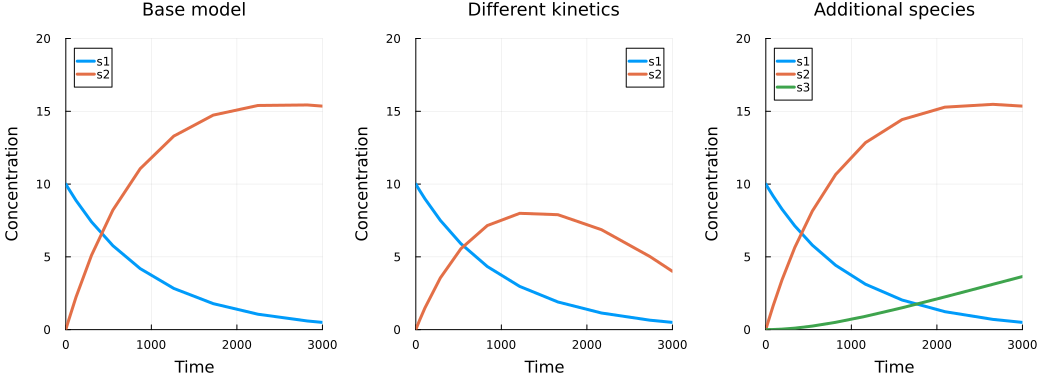
The first variant changes the dynamics of s2. In the second, s1 and s2 follow the same curves as in the base model, while the new species s3 accumulates.
For more simulation examples, see the HetaSimulator documentation.