
Manage multiple Heta models
This guide shows how to keep independent models in one platform and select them for export or simulation.
Use a separate namespace for each model. Components can have the same names in different namespaces without referring to each other.
Before you start, follow the Quick start to install heta-compiler, Julia, HetaSimulator, and Plots.
Create a directory named multiple-models with these files:
multiple-models/
├── index.heta  # independent models and targeted updates
└── run.jl      # model selection, simulations, and plots
Run all commands from this directory.
Define the models
Create index.heta with the complete content below:
/*
  Conversion model: s1 is converted into s2.
  All components in this block belong to conversion.
*/
namespace conversion begin
  comp1 @Compartment .= 1;
  s1 @Species { compartment: comp1, output: true } .= 10;
  s2 @Species { compartment: comp1, output: true } .= 0;
  r1 @Reaction { actors: s1 => s2 } := k1 * s1 * comp1;
  k1 @Const = 2e-3;
end

/*
  Elimination model: s1 is removed from the system.
  These comp1, s1, r1, and k1 are independent of those in conversion.
*/
namespace elimination begin
  comp1 @Compartment .= 5;
  s1 @Species { compartment: comp1, output: true } .= 10;
  r1 @Reaction { actors: s1 => } := k1 * s1 * comp1;
  k1 @Const = 1e-3;
end

/*
  Use space::id to update a component outside its namespace block.
  Each statement affects only the named model.
*/
conversion::s1 .= 20;
elimination::k1 = 5e-4;
The platform contains two independent models. For example, changing elimination::k1 leaves conversion::k1 unchanged. References such as s1 in a reaction's rate resolve within that reaction's namespace.
Components belong to individual namespaces; user-defined functions and units are shared across the platform. Components defined outside a namespace block belong to nameless unless you specify space::id, as in the updates above.
Select models for export
Export all namespaces to SBML:
heta build --export=SBMLThe compiler creates conversion.xml and elimination.xml in dist/sbml/, plus nameless.xml for the empty default namespace. To export only the conversion model, use spaceFilter:
heta build --export="{format:SBML,spaceFilter:'conversion'}"The filter matches namespace names using a regular expression. Previously exported files remain in dist/.
Select models for simulation
Create run.jl and run it from the project directory:
using HetaSimulator, Plots

platform = load_platform(".")
conversion = models(platform)[:conversion]
elimination = models(platform)[:elimination]

Scenario(conversion, (0., 3000.)) |> sim |> plot
Scenario(elimination, (0., 3000.)) |> sim |> plot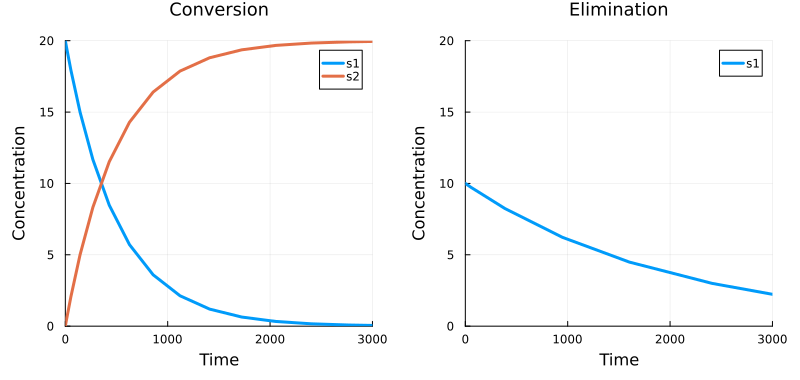
Select each model by its namespace name. Species marked with output: true are plotted automatically. Here, s2 exists only in conversion. In both plots, s1 refers to the species in the selected model.
If your models share a common base, see Create model variants with Heta namespaces.